
You've launched an older version of firefox / 您启动了旧版的firefox
2025-09更新去掉旧版浏览器弹窗和禁用更新提醒
2026-05更新mac版本
今年 3 月初,Firefox 发布公告提醒:旧版本根证书过期会影响早于 Firefox 128(或 ESR 115.13) 的用户。于是我从 121 升级到了 138。
近几天误点到更新,浏览器自动升级到 142。结果油猴脚本无法运行,只好回退到 138。但启动时提示:
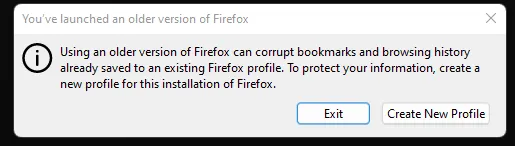
今天找到了一个完美的解决方法
在 Firefox 安装目录或 win+r 中输入:
firefox -allow-downgrade这时候再次打开Firefox,你的旧版本profile就可以使用了!
最近总是跳出弹框提示我使用的旧版浏览器,但点击ok后依旧能继续使用,但为了去掉烦人的窗口提醒,我决定处理掉它
经过漫长的冲浪寻找,终于找到解决方法
1.找到FireFox的配置文件夹存放位置,默认在
%USERPROFILE%\AppData\Roaming\Mozilla\Firefox\Profiles\可以使用win+r开启或者直接在资源管理器路径栏输入
2.进入自己的配置文件夹
3.删除compatibility.ini文件
禁更新提醒和更新
为了防止下次还有可能会误点击到更新按钮,我选择直接禁用更新和更新提醒。
1.先关闭Firefox,
2.进入安装目录,新建一个distribution文件夹
Win 可以右键打开文件位置
Mac 在/Applications/Firefox.app/Contents/ Resources/
3.进入文件夹新建一个policies.json文件并写入以下内容
{
    "policies": {
        "DisableAppUpdate": true
    }
}
Mac也可以使用echo命令
echo '
{
  "policies": {
    "DisableAppUpdate": true
  }
}
' > /Applications/Firefox.app/Contents/Resources/distribution/policies.json
重新打开Firefox,进入设置的更新部分就会发现

感谢
You’ve launched an older version of firefox如何解决
FF: error "You've launched an older version of firefox" - And changes that really impact on profile format
You've launched an older version of firefox / 您启动了旧版的firefox
/archives/2cb5e6b8-4481-44cd-aefd-b8052b80788f